Add songs and memos, arrange the running order, and prepare the setlist for sharing or Conductor sync.
Setlist Detail
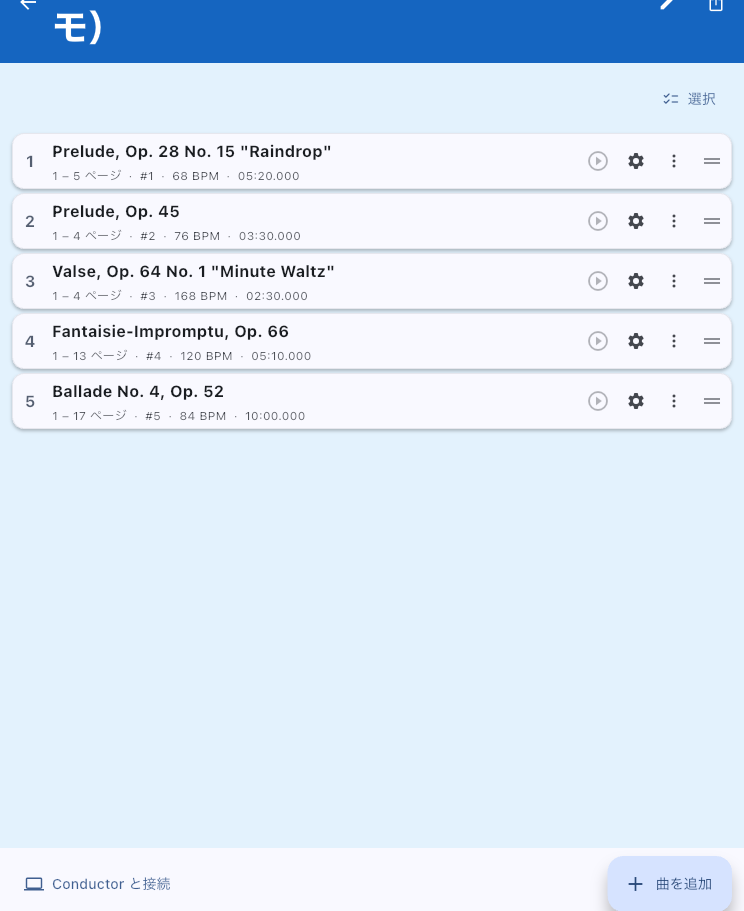
Arrange today's music in playing order and tap a song title to open its score. This screen opens when you select a show or rehearsal in Setlist List. For reading scores and turning pages manually, start with adding songs and checking their order. Prepare audio, automatic page turns, sharing, or Conductor only when you need them.
Add Songs and Arrange the Order
- Tap the add button at the bottom right and choose From Files or Photos, From Library, or Create New. Choose Where to Add From explains PDFs, photos, prepared songs, and the other choices.
- Use the drag handles to arrange added songs and memos in playing order.
- Tap the first song's title to open its score and check that you can read the pages you need.
You do not need to finish all tags and audio before starting. When time is short, check names, running order, and score readability first.
Tap the Title or Open the Menu
Tap a song title to open the score viewer. To change its audio or page range, use that song's menu button (⋮) and open Item Settings. The same menu offers name and tag editing, audio selection, sharing, automatic progression after the song, and removal from the setlist. Text-page songs also offer content editing. Long-press a song or use selection mode to select several songs for tag editing or removal together.
Remember Instrument Changes and MC Notes
Choose Create New → Memo, write a short reminder, and drag it before or after the relevant song. "Change guitar" or "MC 2 min" can then stay with the running order. Tap a memo to edit its label and color, or swipe either way to remove it. A memo is not a song, so it cannot have audio, automatic page turns, tags, or a Conductor song number. A small upcoming memo can also appear in the score viewer. See Setlist Memos for when it appears and how to hide it.
Omit a Song from This Performance
Choose Remove from Setlist from the song's menu. For several songs, select the targets first. This removes them from this running order. Songs, source scores, and audio remain in Library. Add a song again using From Library → Song in Choose Where to Add From. This differs from permanently deleting the whole setlist.
Change Audio or the Page Range
Open Item Settings from the song's menu to adjust its page range, audio, automatic page turns, BPM, meter, and related settings. These changes also affect other setlists using the same song. Duplicate the song first if this performance needs different audio or page turns. Its display-pattern and similar overrides are saved for that particular entry in this setlist. Each song shows whether it has audio, a timeline, BPM, annotations, tags, and display overrides. Open only the songs that need the preparation you intend to use.
Give the Band the Same Running Order
Use the share button at the top right to open Send a Setlist. Besides the order, you can send selected songs' page ranges, audio, automatic page turns, tempo, and memos. To send a subset, select songs before tapping share. For one song with finer control over what to include, use Send a Song from its menu.
Only When You Use Conductor Sync
If your performance does not use Conductor, leave the connection and broadcast controls near the bottom alone. To follow a DAW, connect to its external Conductor and use the setlist-mapping button that appears to check song numbers. Set numbers in Item Settings; see Conductor Setlist Mapping for reading the mapping.
To synchronize Viewers, this device can broadcast as local Conductor. Finish editing first because its running order and Conductor song numbers become the broadcast's reference. Changing song order, count, or numbers during broadcasting prompts you to end sync. Stop sync if necessary, edit, and restart when the setlist is ready.
If You Cannot Find a Song or Setting
- An added song is missing: Check the end of the setlist first. If an import failure was reported, check which files failed.
- A prepared song is missing: Look in the Songs tab in Library. If only the score exists, make a new song with From Library → Score.
- You want a common pre/post playback image or black screen: Open Display before and after playback from the top menu. The final section of Video on an External Display explains its scope and controls.
- You want to change one song's audio or display: Use its menu to open Item Settings; tapping its title opens the score instead.