A sheet for searching across scores, audio, setlists, songs, setlist entries, and setlist memos to jump quickly to what you need.
Global Search
If you cannot remember which setlist contains a song, use the search button at the top and enter part of its name. It searches scores, audio, songs, setlists, and memos between songs together, saving you from opening each setlist in turn. You can search without having added any tags.
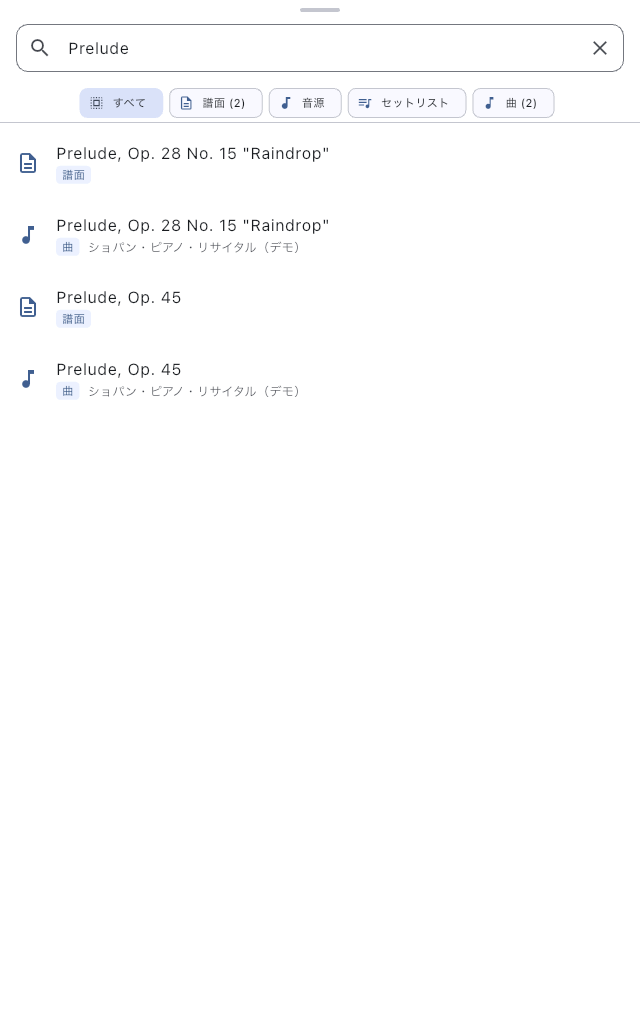
Find Something by Name
- Tap the search button at the top and enter the part of the song or score name you remember. Start without type or tag filters.
- If there are too many results, narrow them by type, such as score or audio, or by a tag.
- Check the name and type, then tap the result you want.
If the name escapes you, try a word you remember from the lyrics or body text. This searches text that can be extracted from PDFs and saved text pages. It does not read words from photos or scanned score images.
Where a Result Takes You
A song may appear as more than one kind of result. Choose the result for the place you want to open.
| Result type | Destination |
|---|---|
| Score, Audio, Song | Library, with that item selected |
| Setlist | That setlist's detail screen |
| Setlist item | Item Settings for that song |
| Setlist memo | The detail screen of the setlist containing the memo |
To return to the running order, choose a setlist result. To change a song's audio or other settings, choose its setlist item result.
If Nothing Appears
- Set the type filter to All and remove selected tags. A filter may be hiding the item.
- Shorten the search. If the filename differs from the song title, try the other name too.
- If you remember deleting it, check Trash. If you have not imported it yet, go to Choose Where to Add From.
After finding it, add a tag only if you want to find it by show name or instrumentation next time. See Bulk Tag Editor to tag several items together.
If browsing a list is easier, open Library or Setlist List.