Edit Plain Text, ChordPro, Markdown, and Fumen pages with format-aware helpers and preview.
Text Page Editor
The Text Page Editor is where you directly edit text-based scores — lyrics sheets, ChordPro charts, Markdown notes, Fumen charts, and similar formats. You can fix lyrics, add chord notation, reorganize sections and headings, use input helpers to keep the syntax tidy, and switch to preview at any time to check how everything looks.
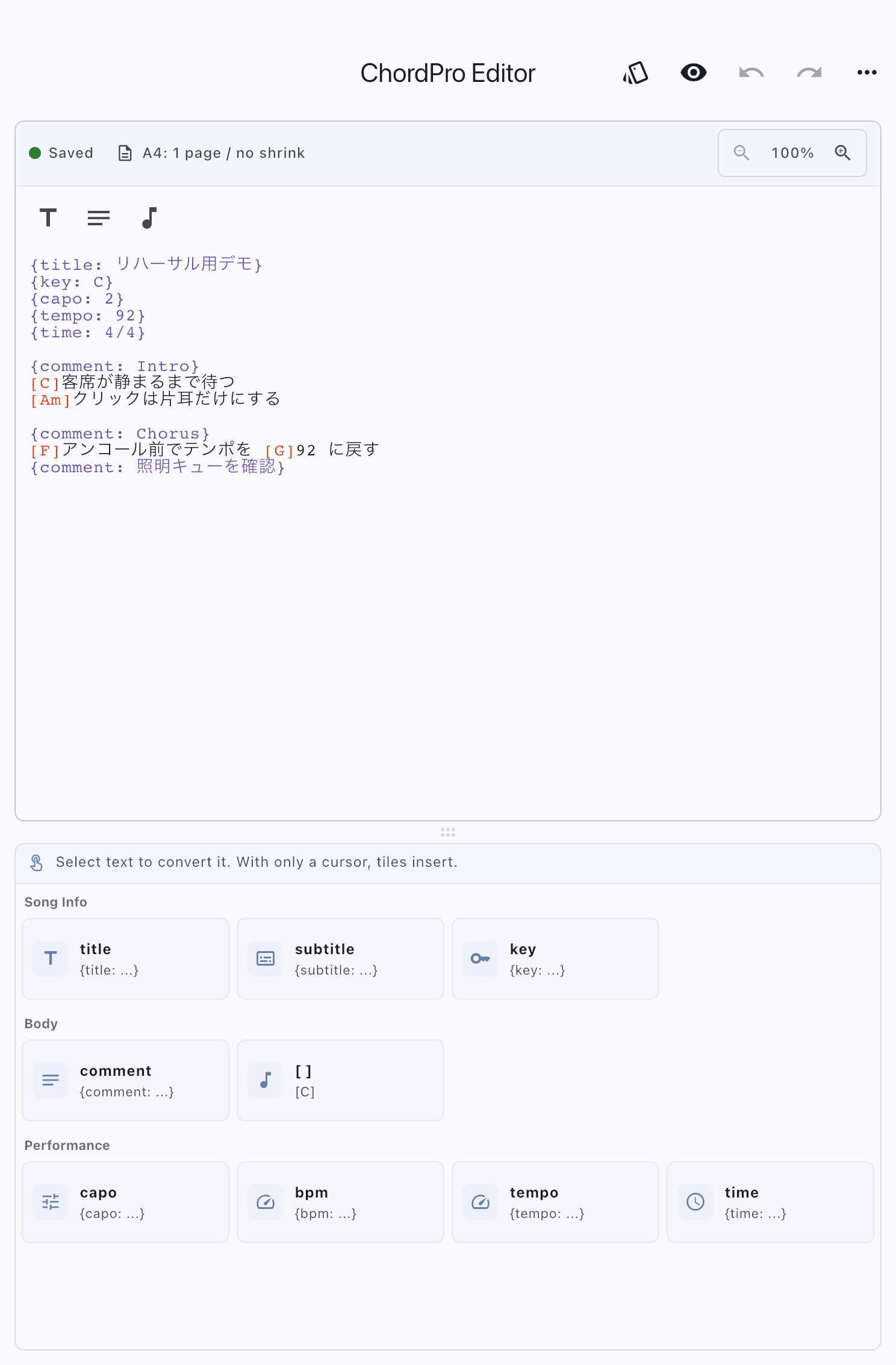
Fix Lyrics or Chords
Edit the text page from the Score Library, or open body-text editing from the Score Viewer's top bar. The editor initially opens in edit mode.
If other songs use the same text page, source edits affect those songs too. Duplicate the score first when only the current song should change.
- Place the cursor at the lyric, chord, or heading to correct and edit it.
- Check that the save status becomes saved. Changes save automatically, but an unsaved status does not mean the work is safely saved.
- Switch to Preview and check chord positions and line breaks. Return to the Score Viewer when the passages you will read are clear.
Use Undo to reverse the last mistaken edit. Enlarging text in the editor differs from enlarging text for performance; use Adjust display in Preview for the latter.
Changing the Text Page Format
You can switch among Plain Text, ChordPro, Markdown, and Fumen. Changing the format changes how the same content is interpreted and displayed, and which input helpers are available.
Use Plain Text for unformatted lyrics and notes, Markdown for text organized with headings and lists, ChordPro when chords need to align with lyrics and transpose together, and Fumen for a chord progression with measures, rhythm, and repeats. See Choosing a Text Page Format for the differences.
If the same text page is used by multiple songs or setlist items, the format change affects every place that uses that page. When the confirmation dialog appears, verify that those other uses should change too. If only one song needs a different format, cancel the change and duplicate the source text page from the Scores tab in the Library. Then open that song's settings, replace its score with the duplicate, and change the duplicate's format.
A missing confirmation dialog does not prove that this song is the only one using the page. When you do not want other songs affected, make sure the page you have open is the duplicate before you edit it.
Make the Editor Easier to Read
The top of the editing area shows whether changes are saved, saving, or unsaved, along with the A4 page count. For formats that shrink to fit long lines, such as ChordPro, it also shows the shrink amount so you can adjust the source width before opening preview. The size buttons on the same row change only the editor text size, from 100% up to 200% in steps. This does not affect the source content, preview, or actual score display. ChordPro chords and directives, along with Markdown headings and formatting tokens, are highlighted so you can see what the editor will interpret as syntax while you type.
Check Performance Size and Page Breaks
Preview shows chord positions, line wrapping, and page breaks close to the performance display. Check whether a verse or a repeated passage breaks at an awkward point.
Display adjustments apply to every text page that supports that setting, rather than only this song.
Adjust font size for small text, line spacing for crowded lines, or margins for cramped page edges. Switch to Preview at the top, then tap Adjust display at the lower right. The adjustment panel opens over the actual document you are editing. The available controls depend on the text-page format:
- Plain Text supports font size, line spacing, and separate top, bottom, left, and right page margins.
- Markdown supports font size, line spacing, and separate top, bottom, left, and right page margins.
- ChordPro supports font size, line spacing, separate page margins, and a ChordPro layout preset. The layout preset is available only for ChordPro.
- Fumen uses the fixed layout defined by its renderer. Font size, line spacing, and page margins are not adjustable; the panel only explains that the layout is fixed. To change minor/major labels or use full-size inline chord suffixes, edit
%PARAMin the source instead. Cheat sheet includes a syntax example; see Fumen chord display. This does not use the ChordPro layout preset.
Changes appear immediately in the document behind the panel. You can turn through a multipage document and continue paging outside the panel while checking the overall balance. When you are finished, close the panel with its close button, the Adjust display button, or Back.
Advanced Display Settings is the lower-frequency management screen for additional fonts and reviewing text-page defaults together. For routine finishing work against the current document, use Adjust display in Preview.
Enter Notation
For Plain Text, type the characters you want to see; there are no syntax-specific helpers. ChordPro and Markdown use different helpers from Fumen.
Add Chords to Lyrics or Organize Headings
ChordPro and Markdown have commands above the editor and a helper panel on the right, or below on a narrow screen. ChordPro helpers insert a title, key, capo, BPM, meter, or Intro/Verse/Chorus headings. Markdown helpers add headings, lists, checklists, bold, italics, underline, and color. Markdown underline and color use app-specific notation.
Select existing words before applying a command to make them a chord or formatted text. To insert new notation, place the cursor and use the command. Drag the handle between the editor and helper panel to give the side you need more room.
Write Fumen Barlines and Repeats
Type chords and text with the keyboard, and use the symbol bar below for punctuation that is harder to enter. Scroll it horizontally to find more symbols.
| Button | Inserted notation |
|---|---|
| Barline | | |
| Repeat start / end | ||: / :|| |
| Double / final barline | || / ||. |
Symbols are inserted at the cursor without changing surrounding spaces or punctuation. A selection is replaced. You can insert a symbol even while the chart is incomplete.
[], (), and quotation marks wrap selected text. With no selection, they insert a pair and put the cursor inside, ready for a section name or other text. You can also insert @. When composing Japanese text, commit the text before using symbols. One Undo reverses an insertion.
Look Up Notation or Insert a Template
Fumen's Cheat sheet has short examples for chords, rests, text placement, sections, repeats, song information, and %PARAM. Reading it does not change the source.
Templates inserts the displayed source from repeats and navigation, song information, or display and chord notation. Edit numbers and values in the source afterward. Title, subtitle, and artist values are empty, ready for your song details. Display templates include hiding the footer, showing or hiding the staff, and a %PARAM example.
- Repeats and navigation replace the current selection.
%settings go after the last line beginning with%, regardless of cursor position. If there is no such line, they go at the top with a blank line before the body. The cursor moves to the new line's end.
One Undo reverses either insertion. Existing settings are not merged automatically. If %PARAM already exists, add the needed options to that line instead.
Transpose and Reference
For ChordPro and Fumen text pages, you can open Transpose to change the key of every chord at once. Fumen preserves the chord body and saves the official %KEY and %TRANSPOSE directives. The quick reference sheet is available for ChordPro.
Both are handy when you need to adjust the playing key while polishing a chart, or when you need a quick reminder of the syntax.
Related Features
These features support body-text editing with quick reference and display adjustments.
- Choosing a Text Page Format: Compare Plain Text, Markdown, ChordPro, and Fumen and see what each format is best for.
- ChordPro Layout: Switch the ChordPro layout preset on the fly without leaving the editor.
- ChordPro Quick Reference: Look up notation and basic operations instantly.
- Transpose: Shift every chord to another key to suit a singer or an instrument.
Related Screens
Operations you perform outside this screen — changing settings or checking the final display — are accessible from here.
- To manage additional fonts or text-page defaults together, open Advanced Display Settings from the upper-right overflow menu. See Text Page Settings for details.
- To check the score in its actual display state, open Score Viewer.
Troubleshooting
- Fumen syntax error — Tap Syntax error near line … to reach the detected line. Line numbers count source line breaks, not visual wrapping. Check that line and the preceding one, then correct the source and check Preview. An error without a line number shows Content can’t be rendered.
- Still saving or unsaved — Do not assume edits will remain next time until the status shows saved. Note any error and use the contact form with the text-page format, save status, and the steps you took.
- Input helpers or transpose option are missing — Plain Text does not show syntax-specific input helpers. Fumen has a symbol bar, Templates, and Cheat sheet. ChordPro and Markdown pages show a command bar and persistent helper panel. Transpose is available for ChordPro and Fumen. Check the song or score's text page format.
- A key is required when you transpose — For ChordPro, add a key directive near the top of the content, such as
{key: C}. For Fumen, choose Original key in the Transpose sheet and apply it together with the target key. - A message says the format change will affect other songs — The same text page is used in more than one place. Continue only if all of them should change. To change just this song, cancel, duplicate the text page, and change the duplicate.