Adjust the metronome sound and the downbeat accent while listening to a preview.
Metronome Settings
Adjust the metronome when the click gets lost in the ensemble, you need to distinguish the downbeat, or sound alone is hard to follow. If the current click lets you keep the beat, you do not need to choose a different sound. Change BPM and meter in Cue Details, rather than here.
Make the Click Easier to Hear
Long-press the metronome button in the Timeline at the bottom of the Score Viewer. You can also open the same settings from Global Settings.
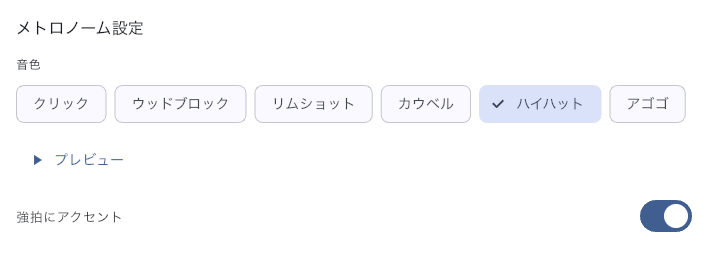
- Stop song playback, choose a Sound, and use Preview to hear it. Connect the speaker or headphones you will rehearse with, and check that the click stands out from the other sounds.
- Turn on Accent downbeat if you need to hear the start of each bar.
- Press Stop when you finish the preview. Play the actual song and check it again at that song's tempo and meter.
The sound and accent settings apply throughout the app. They do not change this song's BPM or meter. To change click volume or its destination, open Mixer Settings.
Follow the Beat Visually
Show bouncing ball makes a ball bounce with the beat on the Timeline. It is on by default. Use it to check the beat visually while listening, or turn it off if it distracts you.
Showing the ball and routing the click are separate choices. To keep the click out of the audience speakers, check the metronome's output in Mixer Settings; hiding the visual beat does not change the sound output.
Prepare Defaults for Spoken Counts
Voice Count speaks the beats in selected bars. Set default bars and a voice for Count every beat, Half-time, first half, and Half-time, second half.
These values are used the first time you enable Voice Count for a song in Item Settings. They do not change values already saved for other songs. To change only the song you are rehearsing, choose its bars and voice in that song's settings. Keep the metronome on during playback.
If the Click Is Missing or the Beat Is Wrong
- No click — Turn the metronome on in the Score Viewer, then check its level and output in Mixer Settings. Choosing another sound will not fix a wrong output.
- There is a click, but the BPM or meter is wrong — Check the opening BPM and meter in the cue at time 0. If the problem starts later, check the nearby cue in Cue Details.
- Only Voice Count is silent — Check that the song has Voice Count enabled, the count-in or selected bars are correct, and the metronome is on during playback.
- A call interrupted the sound — A standalone or parent Viewer pauses at that position. A child following a Conductor keeps the song moving and interrupts only its sound. See “When a Call or Notification Interrupts Playback or Sound” in Mixer Settings for recovery.
See Score Viewer for playback controls, or Global Settings for app-wide settings.