Save a new playing key for all chords in a ChordPro or Fumen chart.
Transpose
Change all the chords in a ChordPro or Fumen chart to suit a singer's range or your instrument. This changes the chart's chords; it does not transpose a recorded audio track.
Changes are saved to the source chart. Other songs using that same score are affected too. To keep the original key alongside another key, first duplicate the score in the Score Library and use it in a separate song.
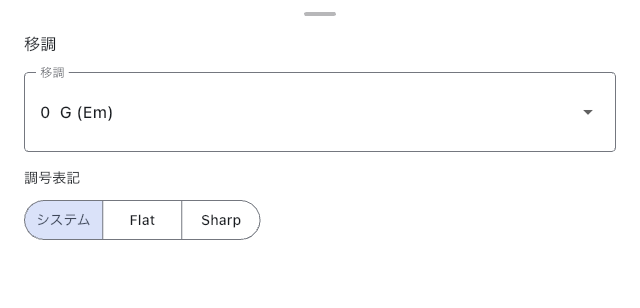
Change ChordPro Chords
In Text Page Editor, add the actual key near the top of the chart, such as {key: C}, then open Transpose. Without a key, the app cannot determine the transposition reference. You can also add it through the key Input Helper.
- Choose how many semitones to move up or down.
- Choose Spelling: use the default from the app setting, or select Flat (♭) or Sharp (♯).
- Confirm the choice, then check the opening chords and any slash chords in Preview.
Confirming rewrites the chord symbols in the source. If you chose the wrong key, use Undo in the editor to reverse that last edit and check in Preview that the original chords are back.
Change the Displayed Key in Fumen
Open Transpose in the Fumen editor. Check the original key, current displayed key, target key, and flat/sharp spelling, then press Apply. The sheet shows the change from both the original and current displayed keys, so you can check a chart that has already been transposed.
If the chart has no %KEY, select the original key before applying. Even if the current display uses C as its reference, that is a Fumen default and does not establish the song's original key.
Fumen leaves the chord body in its original key and saves the official %KEY and %TRANSPOSE directives to the source. Preview, Score Viewer, and PDF export show the transposed chords. To return to the original key, select it in Transpose and apply; %TRANSPOSE is removed.
If notes with explicit pitches are written separately from chord symbols, a warning appears. Continuing will not change those pitches. Choose Transpose chords only only if that is what you intend, then check both notes and chords in Preview.
If Transposition Fails or the Key Is Wrong
- ChordPro needs a key — Add the actual key to the source and reopen Transpose.
- Fumen's Apply is unavailable — Wait if analysis is still running. Choose Retry if it failed. Select the original key if missing, and read any explicit-pitch warning.
- Fumen content cannot be rendered — Return to the source, correct
%KEYor%TRANSPOSE, and check Preview. The syntax-error guidance in Text Page Editor can help locate the problem. - The chart no longer matches the audio track — This operation does not transpose recorded audio. Use audio in the new key or return the chart to its previous key.
See ChordPro Quick Reference for notation, or Choosing a Text Page Format for the differences between formats.